Pagina 1 din 1

Personalisierte Koffer mit deinem eigenen Foto oder Text

Scris: Mar Oct 13, 2026 4:17 am
de gestaltenselbstdiy
Keine Lust mehr auf das Ratespiel am Gepäckband? Ein personalisierter Koffer ist das ultimative Geschenk für den Entdecker in deinem Leben oder, wenn du selbst gerne reist, ein einzigartiger Begleiter für deine Reisen. Egal ob für eine Traum-Hochzeitsreise, einen schnellen Städtetrip oder eine Geschäftsreise – unser personalisierter kofferüberzug Gepäck findest du in verschiedenen Größen und mit vielfältigen Personalisierungsoptionen.

Personalisiere deinen Koffer mit deinem Foto und Text
Mit unseren fortschrittlichen Drucktechniken kannst du deinen Trolley oder Koffer einzigartig und unverwechselbar machen. Wir sorgen dafür, dass dein Design lebendig aussieht und dauerhaft geschützt bleibt.

Hochwertiger Fotodruck
Möchtest du deine Tasche schon von Weitem erkennen? Füge deine liebste Reiseerinnerung, ein Bild deines Haustieres oder ein auffälliges Muster hinzu. Wir kofferüberzug foto dein Design auf einem hochwertigen Inlay, das sicher hinter einer transparenten, stoßfesten Schale sitzt. Unser Reise-Inlay besteht aus strapazierfähigem Material und ist so optimal vor Stößen geschützt.

Personalisierter Name, Text oder kofferbezug mit gesicht
Gib deinem Koffer eine persönliche Note, indem du einen Namen, Initialen oder ein lustiges Reise-Zitat hinzufügst. So stellst du sicher, dass dein Koffer unverwechselbar ist und nicht verwechselt wird.

Business & Logos
Wir können dein Firmenlogo auf unsere Koffer bedrucken, schon ab einem Stück. Für größere Bestellungen (ab 10 Stück) hilft dir unsere Business-Abteilung gerne dabei, das perfekte Firmengeschenk zu gestalten.

Die perfekte Passform finden: Typen und Stile
Wir haben einen Koffer für jede Reiseroute, von Wochenendausflügen bis zu monatelangen Expeditionen:

Handgepäck-Trolleys: Die ideale Wahl für Städtetrips und Kurzurlaube. Diese Trolleys erfüllen die Standard-Fluglinienmaße für Handgepäck, sodass du lange Check-in-Schlangen überspringen und deine wichtigsten Dinge griffbereit haben kannst.
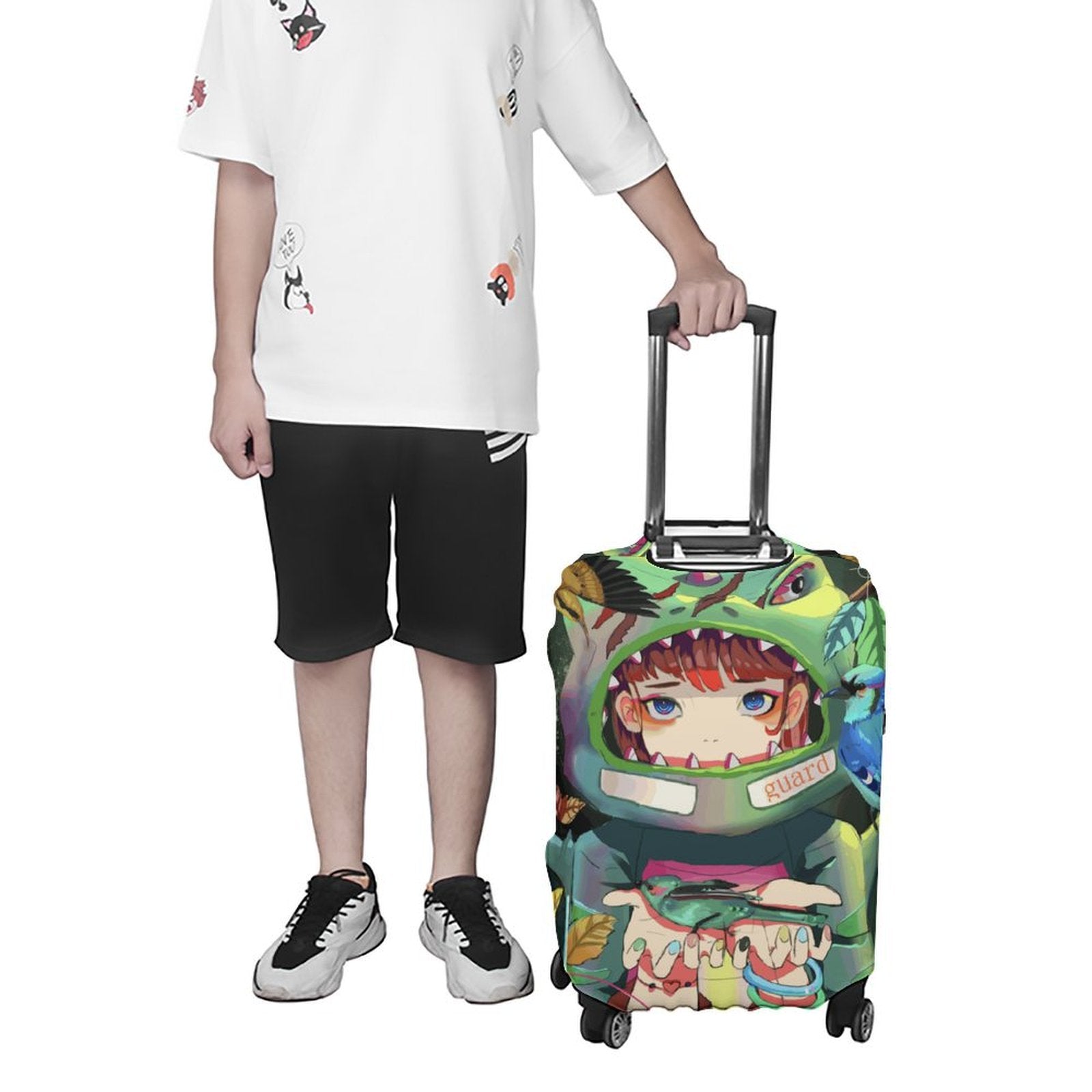
Imagine

XL- oder XXL-Koffer: Wähle aus verschiedenen Größen: Unsere XL-Koffer bieten 66 Liter Fassungsvermögen, während die XXL-Koffer mit 102 Litern sogar über 20 kg fassen können.
Zeitlose Leder-Wochenendtasche: Die klassische Wochenendtasche aus hochwertigem Leder. Füge deinen Namen oder deine Initialen hinzu für eine stilvolle Note.
Hochwertige Leder-Wochenendtasche bereit zur Personalisierung

Verwandle dein Gepäck mit personalisierten Inlays
Keinen neuen Koffer nötig? Du kannst separate Inlays bestellen, um deinem Gepäck für die nächste Reise einen frischen Look zu verleihen. So können auch verschiedene Familienmitglieder denselben Koffer mit ihrem ganz persönlichen Stil nutzen.

Wähle eine Lieblingserinnerung, ein lustiges Bild oder ein beliebiges Design, das du möchtest, und verleihe deinem alten (oder neuen) Koffer einen frischen Look. Das Tolle an den Inlays ist, dass du sie immer wieder neu kombinieren und gestalten kannst. So hast du jedes Mal das Gefühl, einen neuen Koffer dabei zu haben, wenn du das Design wechselst!

Ein personalisierter Koffer für jeden Meilenstein
Ein personalisierter Koffer ist ein bedeutungsvolles Geschenk, das perfekt zu den wichtigsten Meilensteinen des Lebens passt:
Hochzeiten & Hochzeitsreisen: Ein romantisches und praktisches Geschenk für Frischvermählte. Personalisiere ein passendes Set mit ihren neuen Titeln oder einem Foto von ihrem großen Tag.
Abschluss & Gap Years: Das perfekte „Auf Wiedersehen und viel Glück“-Geschenk für Studenten, die die Welt erkunden wollen.
Weihnachten 2026: Ein herausragendes Geschenk unter dem Baum, das alle auf ihre Urlaubspläne im neuen Jahr freut.
Geschäftsreisen: Verleihe deinem Team einen professionellen, einheitlichen Look mit gebrandetem Gepäck, das dein Unternehmen an jedem Terminal repräsentiert.
Bereit, dein nächstes Abenteuer stilvoll zu beginnen?

Re: Personalisierte Koffer mit deinem eigenen Foto oder Text

Scris: Mar Oct 13, 2026 9:07 am
de will
0x800f081f – ERROE_CODE_FIXES may appear when Windows cannot find the required source files for a repair or installation task. Learn about common causes and practical troubleshooting methods. Follow simple steps to identify missing components and resolve the issue efficiently.
Looking for 0x800f081f – ERROE_CODE_FIXES ? This Windows error can occur when necessary files or component sources are unavailable. Explore useful solutions for checking system components, repairing missing files, and improving Windows functionality.
0x800f081f – ERROE_CODE_FIXES is commonly associated with missing or inaccessible Windows source files. The issue may affect system repairs, updates, or feature installations. Discover helpful troubleshooting tips to identify the cause and apply suitable fixes.
If you are experiencing 0x800f081f – ERROE_CODE_FIXES , Windows may be unable to locate the files needed for a specific operation. Understanding the source of the problem can simplify troubleshooting. Learn effective methods to check system files and restore required components.
0x800f081f – ERROE_CODE_FIXES can interrupt Windows maintenance or feature installation when required source content cannot be found. Explore practical ways to troubleshoot missing sources and repair related system issues. Get clear guidance for addressing this error effectively.

Re: Personalisierte Koffer mit deinem eigenen Foto oder Text

Scris: Mar Oct 13, 2026 9:09 am
de will
Facing 0x800f081f – ERROE_CODE_FIXES on your Windows computer? This error may indicate that the required repair source is unavailable or inaccessible. Find simple troubleshooting steps to inspect system components and resolve source-related problems.
Understanding 0x800f081f – ERROE_CODE_FIXES can help when Windows fails to complete a repair or installation process. Missing component files are one possible reason for this issue. Explore reliable troubleshooting approaches to restore the required Windows resources.
When 0x800f081f – ERROE_CODE_FIXES appears, Windows may need source files that are not available at the expected location. This can affect servicing and feature-related operations. Learn how to identify missing resources and use suitable troubleshooting methods.
0x800f081f – ERROE_CODE_FIXES may prevent Windows from completing certain system tasks because required source files cannot be located. Discover helpful information about possible causes and solutions. Use these troubleshooting tips to address missing-source problems efficiently.
Searching for solutions to 0x800f081f – ERROE_CODE_FIXES ? This error can be linked to unavailable Windows component sources during system operations. Learn practical steps for checking files, repairing components, and resolving the issue for smoother Windows performance.

Re: Personalisierte Koffer mit deinem eigenen Foto oder Text

Scris: Mar Oct 13, 2026 9:10 am
de will
0x80070005 E_ACCESSDENIED is a common Windows error that indicates an access or permission problem. It may appear when an application cannot use a required file, folder, or system resource. Check administrator privileges and security settings to troubleshoot the issue.
If you are facing 0x80070005 E_ACCESSDENIED on Windows, restricted permissions may be preventing a program from completing an operation. Reviewing user account access, application permissions, and security settings can help identify the cause.
The error 0x80070005 E_ACCESSDENIED can interrupt software installation, system tasks, or access to protected resources. Understanding the possible permission issues can help users choose appropriate troubleshooting steps and restore normal functionality.
Windows users may encounter 0x80070005 E_ACCESSDENIED when a requested operation is denied by the system. Checking administrator access, folder permissions, and relevant Windows security configurations may help resolve this access-related problem.
Troubleshooting 0x80070005 E_ACCESSDENIED starts by identifying which application or Windows process is being denied access. Reviewing account privileges and permissions can help determine why the requested resource cannot be accessed.

Re: Personalisierte Koffer mit deinem eigenen Foto oder Text

Scris: Mar Oct 13, 2026 9:11 am
de will
When an application suddenly stops working because access is restricted, 0x80070005 E_ACCESSDENIED may appear. This guide helps users understand common permission-related causes and provides general directions for checking Windows access settings.
A permission restriction can prevent Windows programs from accessing necessary files or system components. If you see 0x80070005 E_ACCESSDENIED , checking administrator privileges and security permissions can be a useful starting point for troubleshooting.
0x80070005 E_ACCESSDENIED may occur during application setup, updates, or other Windows operations that require specific access rights. Identifying restricted resources and reviewing the related permissions can help users address the error.
Experiencing an access problem on your Windows computer can be frustrating, especially when 0x80070005 E_ACCESSDENIED appears unexpectedly. Checking user permissions, administrator settings, and application access may help locate the underlying issue.
If Windows prevents an application from completing a requested task, permission settings may need to be reviewed. The 0x80070005 E_ACCESSDENIED error can often be investigated by checking account privileges, security controls, and access to required resources.

Re: Personalisierte Koffer mit deinem eigenen Foto oder Text

Scris: Mar Oct 13, 2026 9:13 am
de will
Windows may block an application or system process when the required permissions are unavailable. E_ACCESSDENIED 0x80070005 is commonly associated with access restrictions and can affect different Windows operations. Checking account privileges and security settings may help identify the cause.
When a Windows program cannot access a required file, folder, or system resource, permission settings may be responsible. Reviewing administrator access and security permissions can help troubleshoot the E_ACCESSDENIED 0x80070005 error effectively.

Re: Personalisierte Koffer mit deinem eigenen Foto oder Text

Scris: Mar Oct 13, 2026 9:14 am
de will
Having trouble with a Windows application that suddenly refuses access? The E_ACCESSDENIED 0x80070005 error may appear because of restricted permissions or blocked resources. Understanding the possible causes can make troubleshooting easier.
Access restrictions can prevent certain applications from completing their tasks properly. Users experiencing E_ACCESSDENIED 0x80070005 can review administrator privileges, folder permissions, and Windows security settings to find a suitable solution.
E_ACCESSDENIED 0x80070005 may occur during software installation, system operations, or when accessing protected resources. Checking user account permissions and application privileges can help determine why Windows is denying the requested operation.
If a program cannot perform an expected task, insufficient permissions could be one possible reason. Windows users can troubleshoot E_ACCESSDENIED 0x80070005 by reviewing security configurations and ensuring the affected application has appropriate access.
Permission-related problems can sometimes interrupt normal Windows functions and application processes. To troubleshoot the issue, check administrator rights and relevant security settings when E_ACCESSDENIED 0x80070005 appears on your device.

Re: Personalisierte Koffer mit deinem eigenen Foto oder Text

Scris: Mar Oct 13, 2026 9:17 am
de will
Windows may display this error when an application is denied access to a required resource. Learning about common causes of E_ACCESSDENIED 0x80070005 can help users check permissions and apply appropriate troubleshooting steps.
When access to a file, folder, or system component is restricted, certain Windows tasks may fail. The E_ACCESSDENIED 0x80070005 error can be investigated by checking account privileges and application permissions.
Users looking for ways to troubleshoot Windows access problems should first review the permissions involved. E_ACCESSDENIED 0x80070005 can be related to restricted access, so checking administrator settings and security configurations may help resolve the issue.
Application access can be affected by Windows security policies, account privileges, or protected resources. These restrictions may result in E_ACCESSDENIED 0x80070005 , making it useful to review the relevant permissions before trying additional fixes.
If an operation fails because Windows refuses the requested access, permission settings should be checked carefully. Understanding E_ACCESSDENIED 0x80070005 and its common causes can help users follow the right troubleshooting approach.

Re: Personalisierte Koffer mit deinem eigenen Foto oder Text

Scris: Mar Oct 13, 2026 9:18 am
de will
Fixing 0x800f0922 INSTALL_ROLLBACK can help resolve Windows installation or update failures that stop the process from completing. This error may appear when system components, update files, or required services face problems. Follow reliable troubleshooting steps to identify the cause and restore a successful installation.
The 0x800f0922 INSTALL_ROLLBACK error may occur when Windows rolls back an update or installation after encountering an unexpected issue. Checking available storage, system services, and update components can help narrow down the problem. Use safe troubleshooting methods before attempting the installation again.
If Windows displays 0x800f0922 INSTALL_ROLLBACK , the installation may have failed and automatically returned to its previous state. Common troubleshooting can include checking system resources and repairing damaged Windows components. Understanding the error can make it easier to complete the update successfully.
0x800f0922 INSTALL_ROLLBACK is an installation-related error that can interrupt Windows updates and system changes. Users can review update settings, restart required services, and check system integrity when troubleshooting this issue. These steps may help prevent repeated installation failures.
When an update stops with 0x800f0922 INSTALL_ROLLBACK , Windows may undo the changes made during the installation attempt. The problem can be investigated by checking system files, available disk space, and update-related services. Proper troubleshooting can help prepare the device for another installation attempt.

Re: Personalisierte Koffer mit deinem eigenen Foto oder Text

Scris: Mar Oct 13, 2026 9:23 am
de will
Searching for 0x800f0922 INSTALL_ROLLBACK usually indicates that a Windows installation or update did not finish correctly. Identifying possible system configuration or component issues is an important first step. Applying standard Windows repair and update troubleshooting can help resolve the problem.
The 0x800f0922 INSTALL_ROLLBACK message can be frustrating when a Windows update repeatedly fails. Checking for corrupted system components, sufficient storage, and active update services may provide useful clues. Once the underlying issue is addressed, the update can be attempted again.
Windows users encountering 0x800f0922 INSTALL_ROLLBACK may need to investigate why the installation process was reversed. Reviewing update components and running appropriate system checks can help identify potential causes. Keeping Windows components in a healthy state may reduce recurring installation errors.
If you are dealing with 0x800f0922 INSTALL_ROLLBACK, start by checking common Windows update and installation issues. Problems with system files, services, storage, or update components can sometimes interrupt the process. A structured troubleshooting approach can help restore normal installation functionality.
Understanding 0x800f0922 INSTALL_ROLLBACK can make Windows installation troubleshooting easier and more organized. The error generally points to an installation process that could not complete and was rolled back. Checking system health and update-related settings may help users resolve the issue and retry the installation.